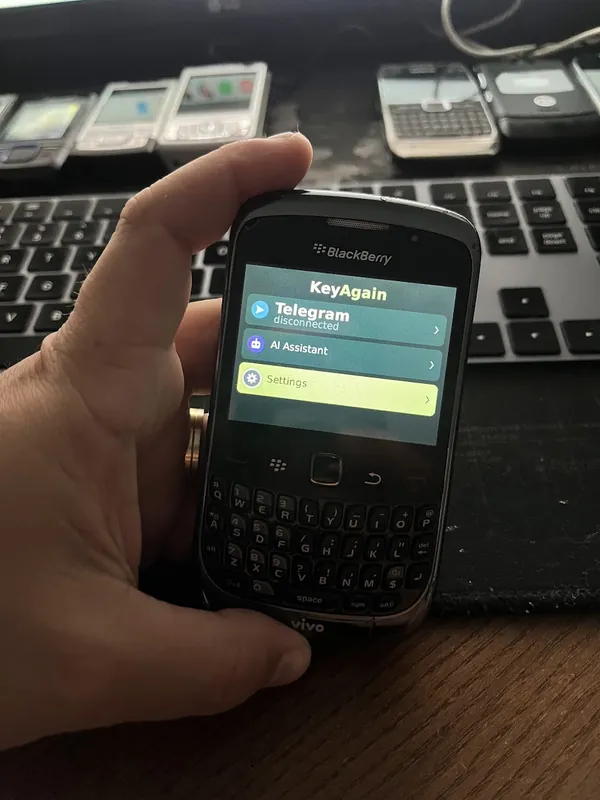


Phone not confirmed yet
Will KeyAgain run on the BlackBerry Curve 8520?
Probably, but not confirmed yet. The hugely popular entry-level Curve, with a trackpad and Wi-Fi but no 3G. Same Java-based BlackBerry OS family as the Curve 9300 we’ve seen running KeyAgain.
At a glance
- KeyAgain
- Not confirmed yet
- Brand
- BlackBerry
- Released
- 2009
- System
- BlackBerry OS 4.6 / 5
- Java
- BlackBerry Java (MIDP 2.0)
- Keyboard
- Full QWERTY keyboard
- Mobile network
- 2G (GSM/GPRS/EDGE)
- Wi-Fi
- Yes
It runs the Java platform KeyAgain is built for, but nobody has confirmed this exact model yet.
What works on the BlackBerry Curve 8520
- Telegram chats, through Telegram’s official API
- WhatsApp and WhatsApp Business chats (beta, unofficial linked-device bridge)
- Photos and voice notes, built into the app (the option shows on phones with a camera and microphone)
- An optional AI assistant for quick questions (paid add-on)
Why it should work, and what we don’t know yet
The BlackBerry Curve 8520 runs BlackBerry Java (MIDP 2.0), the same Java system as phones we’ve already seen running KeyAgain in the BlackBerry OS family. Firmware, screen size and the operator’s network still vary, so we only call a model confirmed once someone has used it. The first 3 days are free: install it and tell us how it went at hello@keyagain.app.
How to install KeyAgain on the BlackBerry Curve 8520
- Open your account at my.keyagain.app on a computer or modern phone, and connect Telegram and/or WhatsApp.
- On the BlackBerry Curve 8520, open the browser and go to m.keyagain.app to download the app (about 156 KB). No browser? Download the file on a computer and send it by Bluetooth or cable.
- Open KeyAgain on the phone. It shows a 6-digit code: type it into your account once. Your chats arrive on the phone.
Tip for the BlackBerry Curve 8520: With no 3G, Wi-Fi is its lifeline where 2G is gone. Elsewhere, set the operator’s APN in the TCP/IP settings.
Networks: will it get online where you live?
The BlackBerry Curve 8520 only has 2G, so it needs a 2G network or nothing. 2G is already off in the United States and Switzerland and is ending in France during 2026, while the UK, Germany, Spain and others keep it for a few more years. It also has Wi-Fi, so it can keep working at home even where mobile networks are gone. Check your country →
Good to know before you start
The phone needs its own internet connection: mobile data on the SIM, or Wi-Fi on models that have it. WhatsApp arrives through an unofficial linked-device bridge that WhatsApp doesn’t endorse, and your main phone must come online at least every 14 days. Messages pass through our server to reach the phone, so this is not end-to-end encryption; the server keeps at most the latest 30 messages of each chat, encrypted, for up to 7 days. Security on an old phone: what KeyAgain does, and what it can’t →
More about BlackBerry OS phones →
Questions
Does the official WhatsApp app still work on the BlackBerry Curve 8520?
No. WhatsApp ended its apps for Nokia Series 40, Symbian, BlackBerry OS and other classic systems in 2017–2018. KeyAgain is a different route: WhatsApp stays on your smartphone and the BlackBerry Curve 8520 receives your chats as a linked device, through an unofficial bridge (beta).
Do I still need a smartphone?
For WhatsApp, yes: it stays your main device and must come online at least every 14 days. For Telegram, no.
How much does it cost?
Basic costs €4.99, £4.49 or US$4.99 a month, with 3 free days to try it. The AI assistant is an optional add-on. WhatsApp is experimental and free while it lasts.