

How it works
Security on an old phone: what KeyAgain does, and what it can’t
A phone from 2004 can’t handle modern internet security on its own. KeyAgain builds it into the app and the server instead. Here is how, with the limits stated plainly.
Why old phones struggle with HTTPS
Secure websites today require recent versions of TLS (the “S” in HTTPS) and recent certificates. Classic phones shipped with old TLS versions and certificate lists that expired years ago. That’s why many old phones can’t open secure sites at all, and why apps that rely on the phone’s own security stop working.
What KeyAgain does instead
- Its own encrypted connection. The app carries our server’s certificate and encrypts the connection to our server itself, without depending on the phone’s outdated security. Nothing to install on the phone.
- Messages kept briefly, encrypted. The server keeps only the latest 30 messages of each chat, stored encrypted, and deletes them automatically within 7 days: just long enough to reach your phone.
- Connections stored encrypted. Telegram session keys are encrypted on our server. Disconnecting an account deletes them.
- No feed, no ads, no data sales. We don’t read, analyse or sell your messages.
The HTTP fallback
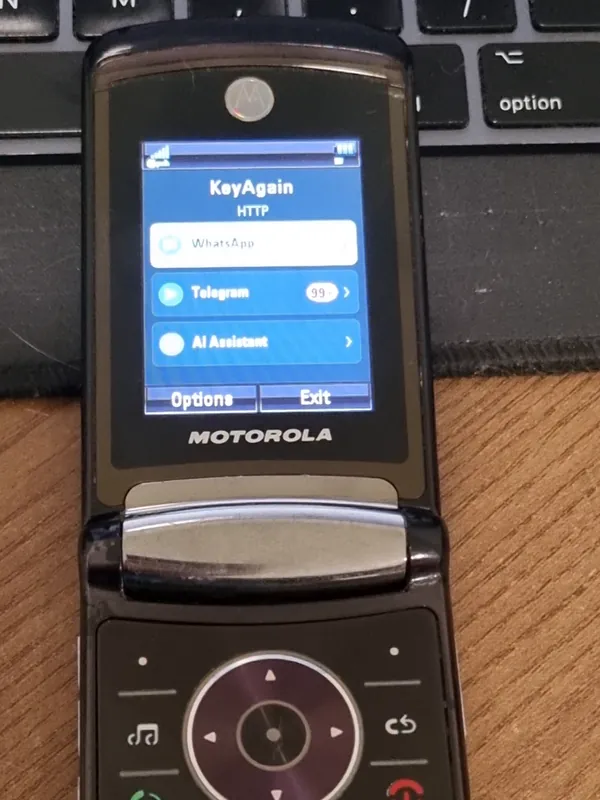
A few very old phones can’t make a secure connection of any kind, even the app’s own. Rather than not working at all, KeyAgain switches to plain HTTP automatically on those phones and shows “HTTP” on its home screen. In that mode, messages travel unencrypted between the phone and our server. If you see “HTTP”, use a network you trust, and keep sensitive conversations for your smartphone.
Not end-to-end encryption
WhatsApp and Telegram secret chats use end-to-end encryption between devices. KeyAgain can’t keep that end to end: the server has to read messages to deliver them to a phone that can’t do the encryption itself. That’s the honest trade-off for using a classic phone.
The “not a signed application” warning
When you install KeyAgain, many phones say it isn’t signed or isn’t trusted. That means it isn’t signed with a phone-maker certificate. It’s expected. Install KeyAgain only from keyagain.app, m.keyagain.app or m.oldphonerevival.com/keyagain.
Good habits
- Lock the classic phone with a PIN or security code.
- Lost the phone? Remove it from your account at my.keyagain.app: it stops receiving messages.
- Keep banking, passwords and two-factor codes on your smartphone.
- Never share your pairing code or account password.